
ABM sources generate an output waveform based on a user-defined expression. Voltage and current output ABM sources are available.
ABM (analog behavioral modeling) sources are much more powerful than linear or polynomial controlled sources because the controlling expression for ABMs is more arbitrary and easier to use. The expression is specified as a mathematical equation which is supported by a large set of mathematical and logical functions and operators.
Any number of node voltage and branch current variables may be used within the controlling expression. For this reason, the ABM sources do not rely on pins for their inputs. The simulation time may also be used as a variable.
Examples
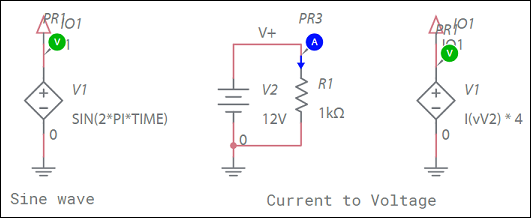
Mathematical expressions
You can create arbitrary mathematical expressions consisting of various functions and operators and apply the results to device parameters.
The functions and operators in the expression can operate on numerical constants, on circuit parameters, and, when used within the Arbitrary Source device, on live circuit variables. Refer to the Supported mathematical functions, operators and constants section for a list of supported mathematical functions, operators and pre-defined constants.
Within the Arbitrary Source device, special functions V(nodeabs), V(node+,node-), and I(deviceX) can be used to reference the circuit voltages and currents.
V(nodeabs)references the voltage at node nodeabs relative to ground.V(node+,node-)references the difference between node+ and node-.I(deviceX)references the current through the device with the instance namedeviceX.deviceXrefers to the SPICE netlist name of the device, not just the ID of the device. For example,vMyVoltageas opposed toMyVoltage. You can view the SPICE netlist name in the SPICE netlist tab of the Information pane.
Only the Independent Voltage source, dependent voltage sources, and inductor devices are supported.
Additional notes
- We recommend that expressions be enclosed in {} to avoid ambiguous syntax. However, this is not required for simulation.
- Portions of expressions that are not enclosed in {} or () should not contain any spaces.
Examples
*High-level filter specification
.param pole=1k
.param res_val=1k
R1 in out {res_val}
C1 out 0 {1/(2*pi*res_val*pole)}
*A very simple diode modeled using an expression in an Arbitrary source
G1 A C value={1e-12*(e^(V(A,C)/0.025)-1 ) }
Supported mathematical functions, operators and constants
Mathematical functions:
| Function name | Alternate name | Parameters | Description | Notes |
|---|---|---|---|---|
| if | — | <code>(test,a,b)</code> | If-else function. If the test returns true, the result is a, else it returns b. | Example: B1 out 0 V={if(v(1)>5, v(1)**2, 0)} |
| sin | sine | <code>( x )</code | Sine function. | — |
| asin | arcsin | <code>( x )</code | Arc-sine function. | — |
| sinh | — | <code>( x )</code | Hyperbolic sine function. | — |
| asinh | arcsinh | <code>( x )</code | Arc-hyperbolic sine function. | — |
| cos | — | <code>( x )</code | Cosine function. | — |
| acos | arccos | <code>( x )</code | Arc-cosine function. | — |
| cosh | — | <code>( x )</code | Hyperbolic cosine function. | — |
| acosh | arccosh | <code>( x )</code | Arc-hyperbolic cosine function. | — |
| tan | — | <code>( x )</code | Tangent function. | — |
| tanh | — | <code>( x )</code | Hyperbolic tangent function. | — |
| atan | arctan | <code>( x )</code | Arc-tangent function. | — |
| atanh | arctanh | <code>( x )</code | Arc-hyperbolic tangent function. | — |
| atan2 | — | <code>( x, y )</code. | Atan 2 function. | Same as: <br>atan (x/y) |
| exp | — | <code>( x )</code | Calculates the exponential e<sup>x</sup>. | — |
| expl | — | <code>( x )</code | Calculates the exponential with a maximum value. | Same as: <br> min (exp (x), y) |
| ln | — | <code>( x )</code | The natural logarithm function. | — |
| log10 | — | <code>( x )</code | The base-10 logarithm function. | — |
| log | — | <code>( x )</code | The generic logarithm function. This function is included for legacy compatibility and its use is not recommended. |
Normally this is the same as ln(x) except in 'B' arbitrary sources where it is log10(x). This behavior is also changed by the .SYNTAX statements. |
| sqrt | — | <code>( x )</code | Square root function. | — |
| abs | — | <code>( x )</code | Absolute value function. | — |
| sgn | — | <code>( x )</code | Sign or signum function. | if (x < 0) sgn(x) == -1 if (x > 0) sgn(x) == 1 if (x == 0) sgn(x) == 0 |
| max | — | <code>( x, y )</code. | Returns the maximum of x and y. | — |
| min | — | <code>( x, y )</code. | Returns the minimum of x and y. | — |
| uramp | — | <code>( x )</code | Ramp function, clips the value against a minimum of 0. | if (x < 0) uramp(x) == 0 if (x >= 0) uramp = x |
| u | stp, step | <code>( x )</code | Step function. | if (x < 0) u(x) == 0 if (x > 0) u(x) == 1 if (x == 0) u(x) == 0.5 |
| table | — | <code>(expr, x1,y1, <x2,y2 <...>>)</code> | Piecewise linear function. Specified x-values must be increasing in value from left to right. Inputs below x1 result in an output equal to y1. Inputs above xn (the largest specified x-value), result in an output equal to yn. In other words, table function acts as a limiter in those regions. Using this function in a Value-type Arbitrary source is functionally equivalent to using the Table-type source. |
The following line: E1 out 0 value={Table(v(in), -60m,-4,0,0,140m,43.3)} is functionally equivalent to the following line: E1 out 0 TABLE {v(in)} (-60m,-4,0,0,140m,43.3) |
| limit | — | <code>( x, a, b ) </code> | Clips the input value x to the range (A,B). | — |
| pwr | — | <code>( x, y )</code. | The pwr function. | Same as: abs(x)^y |
| pwrs | — | <code>( x, y )</code. | The pwrs function. | if (x < 0) pwrs(x) == -(x**y) if (x >= 0) pwrs(x) == (x**y) |
| ddt | — | <code>( x )</code. | Time derivative. | ddt(v(1)*v(CapVoltagenode)) |
| sdt | — | <code>( x )</code. | Time integral. | 1meg*sdt(I(Vsense)+8) |
| V | — | <code>(node)</code> | Voltage of a node. | Can only be used in non-linear controlled source expressions. |
| V | — | <code>(node1, node2)</code> | Voltage difference of two nodes. | Can only be used in non-linear controlled source expressions. Same as: V(node1)-V(node2) Example: E1 out 0 value={V(1,2)*15} |
| I | — | <code>(voltage source) or (inductor)</code> | Current through a voltage source or an inductor. | Can only be used in non-linear controlled source expressions. Example: E1 out 0 value={I(Vsense)**2 + I(E99)}<br>Vsense and E99 are the SPICE netlist names of the devices. They are case insensitive. |
| positive | — | <code>( x )</code | Ensure positive function. | if (x < d) positive(x) = d else positive(x) = x where d is 1.0p |
| negative | — | <code>( x )</code | Ensure negative function. | if (x > -d) negative(x) = -d else negative(x) = x where d is 1.0p |
| nonpos | — | <code>( x )</code | Ensure not-positive function. | if (x > 0) nonpos(x) = 0 else nonpos(x) = x |
| nonneg | — | <code>( x )</code | Ensure not-negative function. | if (x < 0) nonneg(x) = 0 else nonneg(x) = x |
| nonzero | — | <code>( x )</code | Ensure non-zero function. | if (x < d) & (x >= 0) nonzero(x) = d if (x > -d) & (x <= 0) nonzero(x) = -d else nonzero(x) = x where d is 1.0p |
| zero | — | <code>( x )</code | Evaluates x but always returns a value of 0.0. | — |
| one | — | <code>( x )</code | Evaluates x but always returns a value of 1.0. | — |
| schedule | — | <code>(x1,y1, <x2,y2<…>>) </code> | Schedule function. Gives a value of yN for when time between xN and xN+1. | Time is simulation time. |
Mathematical operators:
| Symbol | Alternate Symbol | Description | Usage |
|---|---|---|---|
| + | Addition. | A + B | |
| - | Subtraction. | A - B | |
| / | Division. | A / B | |
| * | Multiplication. | A * B | |
| ** | ^ | Exponentiation (power). | A ** B or A ^ B These take the absolute value of the base. This is consistent with PSpice®. This can be interpreted differently in other simulators. |
| < | Less than. | A < B | |
| <= | Less than or equal to. | A <= B | |
| > | Greater than. | A > B | |
| >= | Greater than or equal to. | A >= B | |
| == | Equal to. | A == B | |
| != | Not equal to. | A != B | |
| & | Logical AND. | A & B | |
| | | Logical OR. | A | B | |
| xor | Logical XOR. | A XOR B | |
| ?: | Ternary if. This operator has two symbols and three operands. | A ? B : C This is the same as IF(A,B,C). |
Built-in constants
| Symbol | Description | Value |
|---|---|---|
| true | Boolean true value. | 1.0 |
| false | Boolean false value. | 0.0 |
| yes | Alternate form of boolean true value. | 1.0 |
| no | Alternate form of boolean false value. | 0.0 |
| pi | The constant pi. | 3.14159265358979323846 |
| e | The constant e. | 2.71828182844590452353 |
| c | The speed of light. | 2.99792458e8 |
| kelvin | Constant to convert between degrees Kelvin and Celsius, and vice versa. | -273.0 |
| echarge | Electron charge. | 1.602176487e-19 |
| boltz | Boltzmann's constant. | 1.3806503e-23 |
| planck | Planck's constant. | 6.62606896e-34 |
| temp | Current temperature of the simulation in degrees Celsius. | The default is 27, but it can be changed from the simulation options. |
| time | Current time of the simulation in seconds. | Current time of the simulation in seconds (it is constant with respect to circuit variables). |
IMPORTANT! Unlike most mathematical languages, Multisim considers the unary minus to have higher precedence than exponentiation (power) operators ** and ^. This means that {-5**2} is +25 while {0-5**2} is -25. Although this is unintuitive, it is standard among SPICE simulators. Use brackets to ensure logical, readable expressions in this case.
Comments
0 comments
Please sign in to leave a comment.