
This component is an interactive digital constant that produces a strong digital 1 (high) or 0 (low) state.
To toggle the state between 1 and 0 in edit mode, select the component and tap or click the toggle button as shown below.
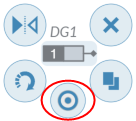
To toggle the state between 1 and 0 when the circuit is running, click or tap the component.
You can also tap or click the State button in the Item tab of the configuration pane to toggle the state, regardless of the mode of the component.
Comments
0 comments
Please sign in to leave a comment.