
A .model statement is limited to defining parameters for a primitive SPICE device.
.model statements follow the syntax:
.model <any model name> <device type> <a list of parameters>
For example, the following is a valid model for an NPN BJT:
.model custom NPN
+IS=1.91e-15 BF=149.5 NF=0.91 VAF=10
+IKF=0.51821
The + character on each line is SPICE syntax for a continuation of a statement on a preceding line.
Do not include any other text except for comments (lines that start with *) and white space. ';' is also comment delimiter.
Using a .model statement:
- Place one of the above components on the workspace.
- Select the component and tap the configuration button
 in the toolbar to open the configuration pane.
 - Select User-defined... from the Model drop-down.
For example, for a diode, select User-defined .model (D):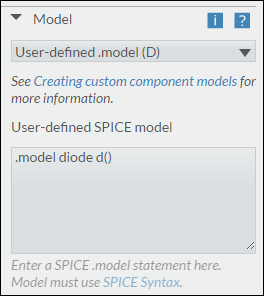
- Enter a valid .model statement in the text box, for example,
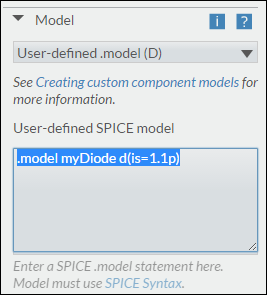
Note. The body of the model definition can be optionally bracketed.
For example,
.model myDiode d(
+ state1
+ state2
)
is the same as:
.model myDiode d
+ state1
+ state2
Comments
0 comments
Please sign in to leave a comment.